
Setup
This guide walks you through configuring ThreadQL after installation — from first login to your first query.
First login
- Navigate to your ThreadQL URL (e.g.,
https://threadql.example.com/panel) - Log in with:
- Username:
master - Password: the master password you set during installation
- Username:
The root URL (/) shows an installation check page confirming ThreadQL is running and displaying the current version.
1. Create a tenant
A tenant represents one Slack workspace. Each tenant has its own datasources, definitions, and settings.
- Click New Tenant in the admin panel
- Enter a name (e.g., your team or company name)
- Save
2. Connect an LLM provider
ThreadQL needs an LLM to translate natural language into SQL.
- Go to LLM Providers
- Click Add Provider
- Enter your API key for your chosen provider (OpenAI, Anthropic, Ollama, etc.)
- Save the configuration
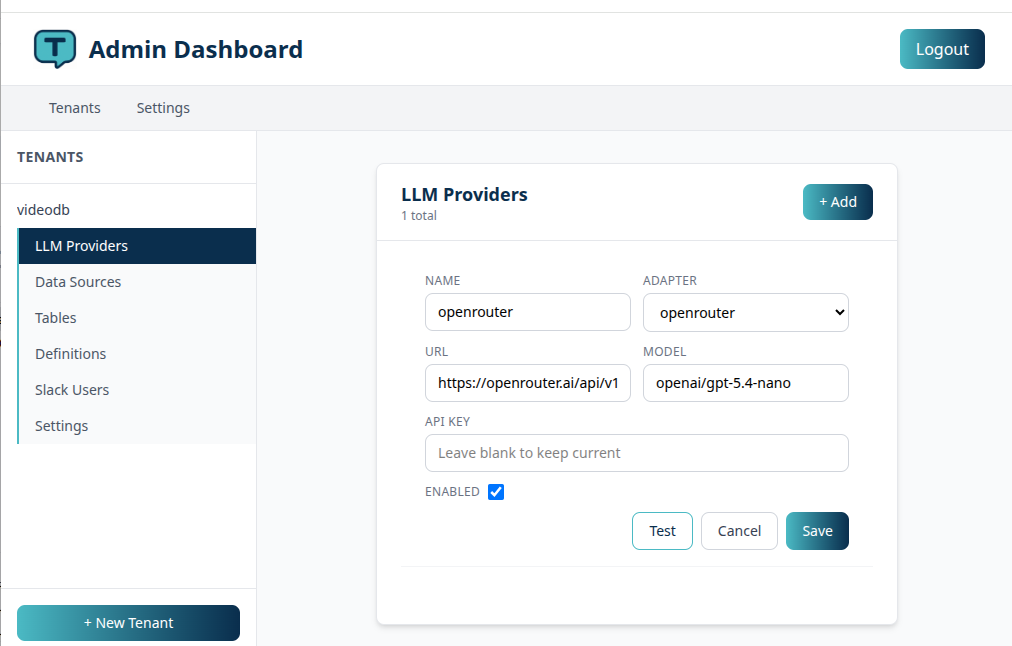
Your API key is encrypted before being stored — see Security for details.
Multiple providers and fallback
You can add more than one provider. If the primary fails (rate limits, outages, 5xx errors), ThreadQL automatically tries the next one in sort order.
To enable fallback:
- Add multiple providers
- Use the sort order to set priority (lower = higher priority)
- Adjust the
fallback_attemptssetting if needed
With debug mode on, you'll see Slack notifications when a fallback occurs.
3. Connect a datasource
- Go to Data Sources for your tenant
- Click Add Data Source
- Choose MySQL or PostgreSQL
- Fill in host, port, database name, username, and password
- Optionally configure SSH tunnel settings for databases behind a bastion
- Save
Use a read-only database user
Create a dedicated database user with only SELECT privileges. See the security section for the SQL commands.
All database credentials are encrypted at rest.
4. Scan tables
After adding a datasource, scan it to discover the available tables:
- Go to Tables for your tenant
- Click Scan Tables
- Once the scan completes, you'll see all discovered tables
- Assign priority scores to the tables your team queries most
The top priority tables have their full schema (CREATE TABLE) included in every LLM prompt. This is what lets the AI write accurate SQL — it needs to know your column names, types, and relationships.
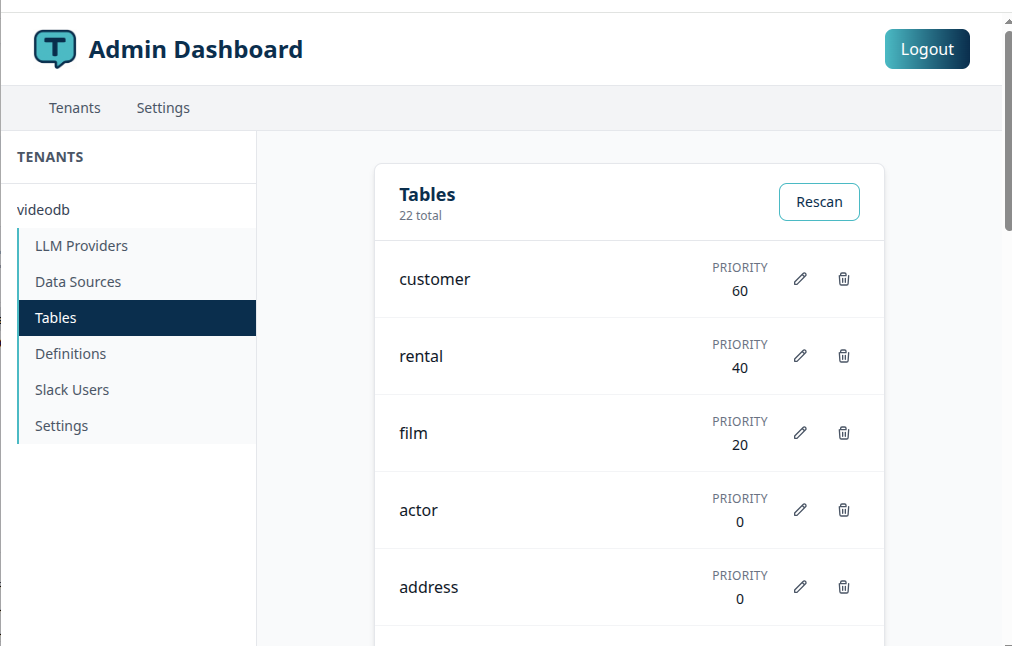
Tables without priority can still be queried. The LLM will fetch their schema on demand when it needs them.
Scheduled scans
You can configure automatic schema rescans so ThreadQL stays up to date when your database changes:
- Set a scan schedule in tenant settings (format:
HH:MM, e.g.,02:00for 2 AM) - Add this artisan command to the cron if you are not using the helm chart:bash
0,30 * * * * php artisan schema:schedule-scans
5. Create a Slack app
- Go to api.slack.com/apps
- Click Create New App > From an app manifest
Generate the manifest
- In the ThreadQL admin panel, go to your tenant's main screen
- Click Generate Manifest
- Copy the generated JSON
- Paste it into the Slack app creation wizard
- Copy the app key and signing secret and paste them into the admin panel tenant screen
- In slack install, the app to your workspace. This will give you the bot token. Copy the bot token and paste it into the admin panel tenant screen.
- Save the app. You can now use the Slack app in your workspace.
ThreadQL will fill in the correct request URLs and OAuth scopes automatically.
6. Add definitions
This is where ThreadQL gets good
Definitions are the single most impactful thing you can do to improve query quality. The more business context you give the LLM, the better it writes SQL.
Use the /threadql define command in Slack:
/threadql define ARR = Annual Recurring Revenue, calculated as MRR * 12
/threadql define active user = logged in within the last 30 days (users.last_login_at)
/threadql define enterprise = customers where plan_type = 'enterprise'
You can also manage definitions from the admin panel under Definitions for your tenant.
What makes a good definition:
- Map business terms to actual column names and values
- Include the table name when it's not obvious
- Mention any calculations or filters that apply
- Be specific — "churn = customers where status changed to 'cancelled' in the period" is better than "churn = lost customers"
7. Start querying
Mention the ThreadQL bot in any Slack channel (or DM it):
@ThreadQL how many orders did we ship last week?
@ThreadQL show me the top 10 customers by revenue this month
@ThreadQL what's the average order value by country?
Reply in the same thread to ask follow-ups — ThreadQL keeps the conversation context.
Debug mode
When you're first setting up, enable debug mode to see what's happening under the hood:
/threadql debug onThis shows you:
- Which LLM provider is being used
- The SQL that was generated
- Fallback events if a provider fails
- Detailed error information
Use this to check whether the LLM is writing the SQL you'd expect. If it's not, add more definitions or adjust table priorities.
Turn it off when you're satisfied:
/threadql debug offOther slash commands
/threadql— show help/threadql list— list available tables/threadql define <term>— add a business definition
User approval (optional)
If you want to control who can use ThreadQL:
- Enable
slack.approval_requiredin tenant settings - Unapproved users will get an ephemeral message telling them to contact their admin
- Approve users from the admin panel under Slack Users
What to expect
Queries not working?
- Check that a datasource is configured (ThreadQL will tell users in Slack if one is missing)
- Verify the LLM provider API key is valid — use the Ping button in the admin panel
- Turn on debug mode to see error details
- Make sure the Slack app is installed and the bot has access to the channel
LLM writing bad SQL?
- Add more definitions to clarify business terms
- Check that the right tables have high priority scores
- Try a more capable LLM model
- Use debug mode to see what SQL is being generated
Follow-ups not working?
- Make sure you're replying in the same Slack thread
- ThreadQL detects follow-ups based on the thread, not the message content
Next: Understand how ThreadQL processes queries internally in How It Works.